1
Capture
- Texts to your Copilot number
- The lead form on each of your listing pages
- Follow Up Boss, both ways (one CRM connection on a founding spot)
Agents Copilot answers a new lead by text, day or night, qualifies them, offers a real showing time from your calendar, and hands the conversation to you the moment it needs your own judgment. Every writing tool from the original Copilot is included, free.
8 founding spots. It starts with a free 5 minute Lead Leak Audit, no call.
82% of agents already use AI (RPR, Feb 2026). The real gap is trust: letting it talk to a real lead while you are not watching. Agents Copilot closes that gap with checked facts. It answers from your real listings, a second AI whose only job is to catch what the first one got wrong reviews every reply before it sends, and a clear line marks exactly when only you should answer.
Every reply is checked against your real listings and Brand Profile before it sends, "Verified Replies." Schools, safety, commission, contracts, financing, or anyone asking for a real person hands off to you immediately, it never guesses. Qualification, follow-up, and real calendar booking all run the same way. The writing tools for listing descriptions, lead follow-ups, social posts and more come included, free.
On 21 October we ran 230 test conversations through the real reply code, using 10 demo listings. We also wrote 60 replies by hand, 40 with a mistake on purpose and 20 correct, and sent them through the second check.
The limits. This is our own test, on demo listings, with a small sample. With 171 replies, the real rate of a wrong fact could still be as high as about 2 in 100. The check can miss things. A question like "which of your listings have a pool?" is its weakest spot, so those replies are held more often. No agent outside Kaiflux has used it yet. You stay the final reviewer. This isn't legal advice. Confirm anything compliance-related with your broker or attorney.
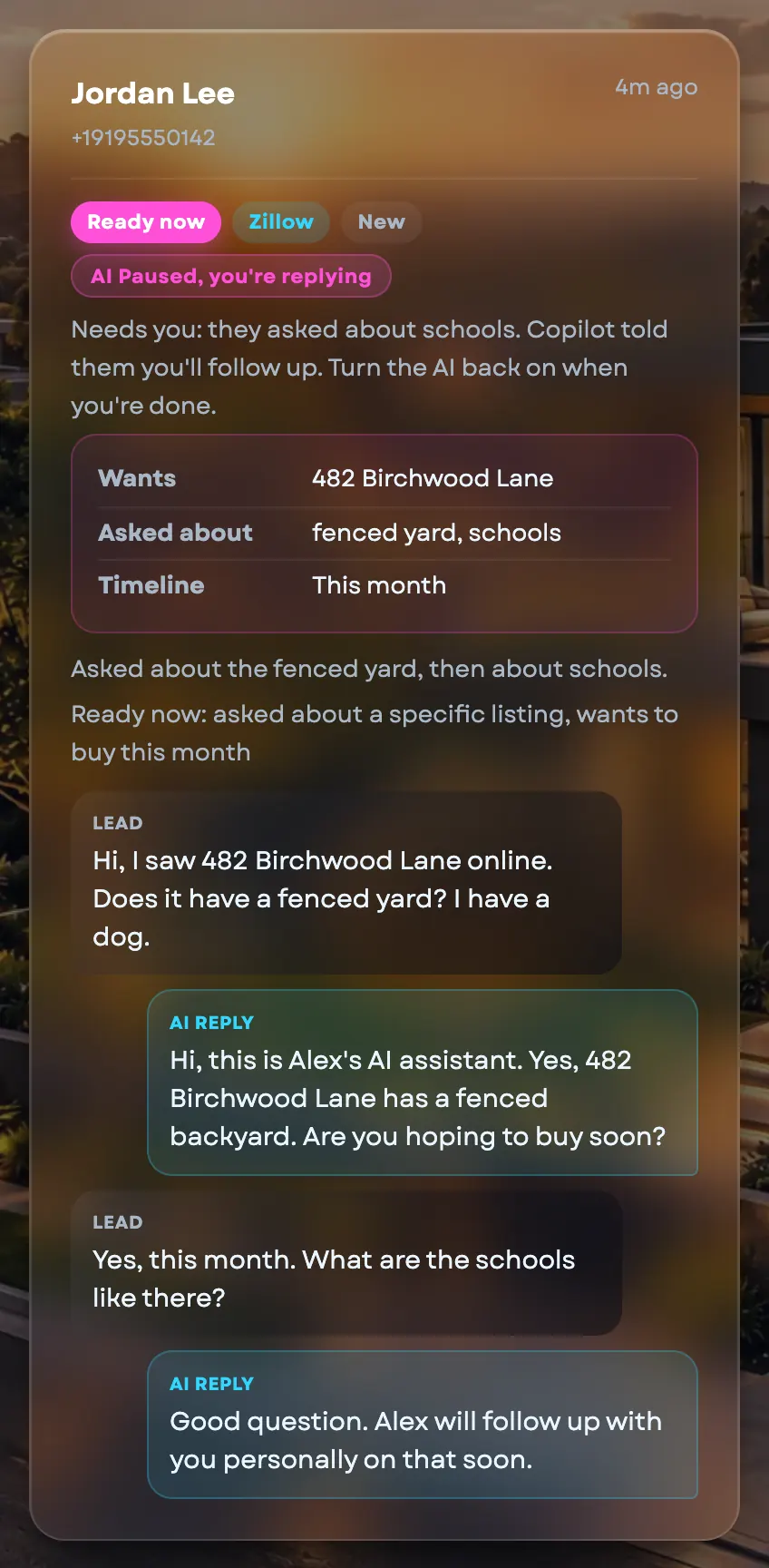
Three test leads texted the same demo listing, 412 Birchwood Lane. These are the real screens from Agents Copilot, and each lead got a different kind of reply.
Schools are one of the topics it never answers. Always confirm anything compliance-related with your broker or attorney.
No named case studies yet, this swaps for real agent stories once a few exist. Until then, here's exactly what each step actually does.
A lead texts at 11pm asking about your listing. They typically get a real, checked reply inside 60 seconds, not a canned autoresponder that ignores what they actually asked.
A buyer mentions their budget and timeline over a few texts. Copilot quietly tracks it and never re-asks something it already knows, one question at a time, never a survey.
A lead goes quiet after the first reply. Copilot checks back on day 1, 3, 7, and 14, and stops the moment they reply, book a showing, or opt out.
A lead wants to see the place. Copilot offers 2 real openings pulled from your calendar. Nothing goes on your calendar until you confirm the pick yourself.
A lead asks about schools, commission, or just wants to talk to a real person. Copilot stops there, and you get the full context, not just a notification.
Only what works today, and all of it comes with a founding spot. Anything I haven't built yet is in its own box further down.
Kaiflux gives you drafting tools, not legal advice. The AI flags risky topics and hands sensitive questions to you, but you stay responsible for what goes out under your name. Confirm anything compliance-related with your broker or your own attorney.
Not manufactured objections. The actual things agents say about handing a lead to AI.
It hands off. Schools, safety, commission, contracts, financing advice, or anyone just asking for a real person, Copilot stops and alerts you with the full context. It never guesses to sound helpful.
Every reply runs through a second, independent AI check against your actual listing data before it sends. If it can't back up what it wants to say, it holds the draft for you instead of sending it.
The first reply says plainly it's an AI answering on your behalf, once, not every message. Quiet hours keep any proactive follow-up inside real hours, an instant reply to a lead who just texted still goes out immediately, they started it.
A CRM's drip campaign sends the same template to everyone on a timer, regardless of what the lead actually said. Agents Copilot reads what the lead wrote, checks its own draft against your real data before it sends, and stops on its own the moment a question needs a human:
Three real alternatives, and why each one falls short on its own terms, not a mocked-up "vs the competition" chart.
A canned template on a timer. It doesn't read what the lead actually asked, can't check a fact against your real listings, and has no idea when a question needs a human instead of a template.
Real judgment, but not at 11pm on a Tuesday, and it's a recurring salary whether 5 leads come in that week or 50.
The status quo. Leads wait until you next check your phone, and a lead who waits hours may have texted someone else by then.
Every text Copilot sends a lead runs through the same 4 steps. This is a real lead asking about a listing, not a scripted demo.
Every reply, every follow-up, and every booking offer runs through this same 4-step check, not just the demo above.
No filmed demo, this is the actual flow, every time.
A text to your Copilot number, or your listing page's own lead form. Copilot creates the thread the moment it arrives.
Drafted against your real listings and Brand Profile, verified by a second AI before it sends, disclosed as AI on the first message.
Budget, area, timeline, financing, one question worked in naturally per reply, never a survey, never re-asking what it already knows.
2 real openings pulled from your actual Google Calendar. You confirm before anything is booked or the lead gets a confirmation text.
Schools, safety, commission, contracts, financing, or anyone asking for a real person, you get the full context, not just a ping.
I'm not a real estate agent. I build AI workflows.
I'm self-taught. I started studying AI seriously about a year ago, and I keep researching, because the field moves fast.
The first thing I learned: when you give an AI no proper instruction, the output is bad. It sounds sure of itself and it invents details nobody gave it. That is a structure problem, not an intelligence problem. Everything I build starts from that.
I ranked markets by how much repetitive writing the job needs. US real estate agents landed near the top, so I started there with writing tools. Then I watched the market move from prompt packs to tools and apps, and some competitors shipped stronger tools than mine. That is why Agents Copilot exists: it answers the lead itself, and every reply is checked before it sends.
I don't think Copilot is finished. Ask me what it does not do yet and I will tell you straight.
A lead just texted asking about your listing on Birchwood Lane. You're at dinner, or asleep, or just not looking at your phone. Somewhere else, another agent's lead just did the exact same thing.
Every writing tool from the original Copilot still comes with it, free. This is just what runs while you're not looking at your phone.
No fake urgency, this is the real offer, and there are really only 8 spots at this price.
Respond, qualify, follow up, book and hand off, from your own texting number. Handles up to 300 new leads a month, with the morning summary, the seller presentation and every writing tool, unlimited.
There's no setup fee, and the $199 is month-to-month. If Copilot isn't answering your leads the way this page says, cancel from your billing settings before the next bill. After your first 3 months the price is $299, so cancel before that bill if you don't want it. No refund promise yet. That comes once the founding agents have run it on real leads and the numbers hold.
US solo agents and small teams (2 to 5 people) who already pay for online leads (Zillow, Facebook, Realtor.com) and get at least 15 new leads a month. If you're getting fewer than that, the pilot's numbers won't mean much yet, the $27 Toolkit or the writing-only plans are a better fit today. Not a lead-generation tool, Copilot answers leads you already have, it doesn't source new ones.
No. Setup is mostly things you already do: connect your Google Calendar, connect Follow Up Boss if you use it, fill in your name and brokerage. The one new step is a Twilio account for your texting number and the US texting registration, which takes a week or more. I walk you through that part, and a written checklist covers the rest.
A CRM's drip campaign sends the same template on a timer, regardless of what the lead actually said. Copilot reads the lead's own words, checks its draft against your real listing data before it sends, offers real openings from your actual calendar, and stops on its own the moment something needs your judgment. Every writing tool from the original Copilot comes included too.
Typically inside 60 seconds, day or night.
It hands off to you with the full context, it never guesses. Schools, safety, commission, contracts, financing advice, or anyone asking for a real person are hard-coded hand-off triggers, not something you have to configure.
Copilot is built for the US residential real estate market specifically, the compliance guardrails, texting rules, and Fair Housing framing all assume US rules and conventions.
No. It works beside your CRM. Follow Up Boss is connected both ways today. Copilot is the layer that replies, qualifies, books and hands off. It is not a full CRM with pipelines, tasks and team features.
It works by text message only, in English, for the US. It does not make phone calls, answer emails or run a web chat.
Founding agents shape what I build next. Tell me what your workflow needs in the audit form. I tell you honestly whether I can build it and how long it would take. It is not a promise of every feature.
$299 a month for the same things: up to 300 new leads a month, the seller presentation and unlimited writing. It stays month-to-month, so you can cancel before that bill. There is no setup fee for a founding agent.
Yes. It's month-to-month. Cancel from your billing settings whenever you want.
Texting. Your Copilot number sits on your own Twilio account, so Twilio bills you for the texts directly, at its published rates. For 100 leads that is roughly $15 to $30 a month, plus Twilio's one-time fees for the US texting registration. The number and the registration stay yours if you leave. A founding spot covers up to 300 new leads a month. If you go over, extra leads are free for your first 90 days, then $0.50 each.
Every founding spot includes the Unlimited plan free: all 19 specialist packs, 1,496 prompts, no generation cap, the same saved-preset writing tools Copilot has always had.
No setup fee. $199 a month for your first 3 months, then $299. Month-to-month, cancel anytime.
Get my free Lead Leak Audit → KAIFLUX
Scroll or pinch to zoom. Drag to move. Double-click to zoom in. Esc to close.